

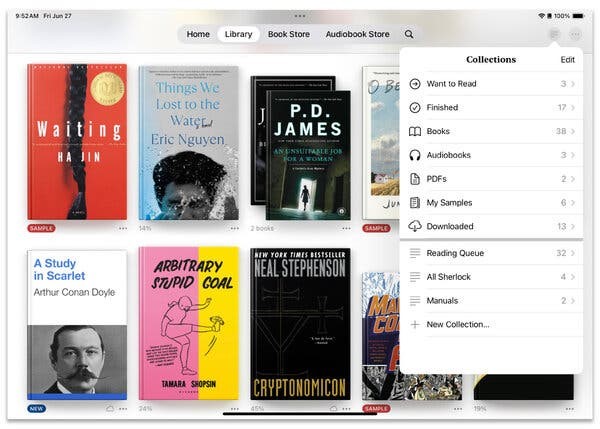
Deleting old files helps, but if you also want better organization, consider sorting your content into “collections” or “shelves” (depending on your app’s terminology).
These groupings work like albums for your photos: You can divide your sprawling library into labeled sections. You can still see the unsorted titles in “list” or “grid” views, but displaying them in Collections or Shelf view adds a sense of order. You can also rename or remove the groupings without deleting the books.
Amazon Kindle
In the Kindle mobile app, tap the library icon at the bottom of the screen to see all the e-books and other content you have acquired. In the Android version, press to select a book and tap the + icon at the top of the screen to add it to a collection. To delete the book, tap the three-dot icon to open the menu of options.
In the iOS version, tap a book cover on the screen to open a menu that allows you to add it to a collection, delete it, or perform other actions.
Image
If you select “Add to Collection,” the app directs you to a screen displaying existing collections from which you can choose. To create and name a new collection, tap Create (Android) or the + button in the upper-left corner (iOS).
You can view your collections by tapping the three-line icon (Android) or the double-arrow icon (iOS) in the upper-right corner and selecting “Collections.”
To remove a collection in Android, select the collection and tap the Trash icon.
In iOS, press and hold the icon until the menu with Remove Collection appears.
And if you haven’t bought a Kindle book lately, recent legal changes now give you a Get Book button right in the iOS app to streamline your purchase.
Apple Books
Tap the Library icon at the bottom of the screen in Apple’s iOS e-book app, then tap the three-dot icon near the cover thumbnail. A menu appears with several options, including deleting the book or adding it to a collection. If you select Add to Collection, the next screen gives you the opportunity to create and name a new collection — or add it to one you already have.
Image
In Apple Books for iOS, tap the three-dot icon next to a book title to open the menu for grouping the book into a collection. You can also share, rename, or delete the book from this menu, or change its reading status.
Apple Books automatically sorts certain file types (books, audiobooks, sample chapters, and PDFs) into their own groups. You can jump to everything by tapping Collections at the top of the Library screen. To hide or remove a grouping from the Collections menu, swipe to the left on its name.
Google Play Books
Tap the Library icon in Google Play Books for Android or iOS. When you press down to select a book, the options “Add to Shelf” and “Remove Download” appear.
If you choose “Add to Shelf,” the following screen lets you add the selected book to an existing group or create a new one. You can also create an empty shelf first and add the books.
After you have created a shelf or two, you can see them by tapping the Shelves menu at the top of the library screen. To rename or delete a shelf while it is open, tap the three-dot menu icon located in the upper-left corner of the screen.
Barnes & Noble Nook
In the Nook app for Android and iOS, tap the Library icon to see your books. In List view, tap the three-dot menu next to a title for the Remove Download or Archive option to weed out old ones.
Tap the Shelves option at the top of the Library screen and then tap the + icon in the top-right corner. On the Create New Shelf screen, select the books you wish to group and tap the Add button. You can manage, rename, or delete an open shelf by tapping the three-dot menu icon in the upper-left corner.
Rakuten Kobo
Tap the My Books (Android) or eBooks (iOS) icon in the Kobo app, then tap the three-dot icon near the book’s cover image to get to the removing and sorting options. Choose Add to Collection to sort the title into a new or existing group.
To open the menu to edit, rename, or delete a collection on Android, tap Collections at the top of the My Books screen. Select the collection you want to use, then tap the three-dot icon in the upper-left corner to open the menu.
In the iOS version, tap More at the bottom of the screen and select Collections. Tap open a collection and then select the pencil icon at the top to edit it.
Once you get your portable digital library organized, you can dive into your summer reading much more efficiently.